 NUILab Agentic AI
Docs / Concepts / A multi-machine agent stack
Concepts
A multi-machine agent stack
Run coding and research agents across several machines at once — in parallel, able to coordinate, mixing local and frontier models — and stay in control of what they do.
One agent on one machine is useful. Running several of them, across several machines, in parallel and able to hand work to each other, is a different kind of leverage — and the setup is not much harder. This page is the map: what the stack is, what each piece does, and where to go to build it yourself. None of it is tied to particular hardware. A “machine” here is any computer you can reach over the network, including the laptop in front of you.
The setup serves three purposes: writing code, setting up and running systems, and research. The same agent that edits a repository can stand up a service or read through a stack of papers — what changes is the prompt, not the plumbing.
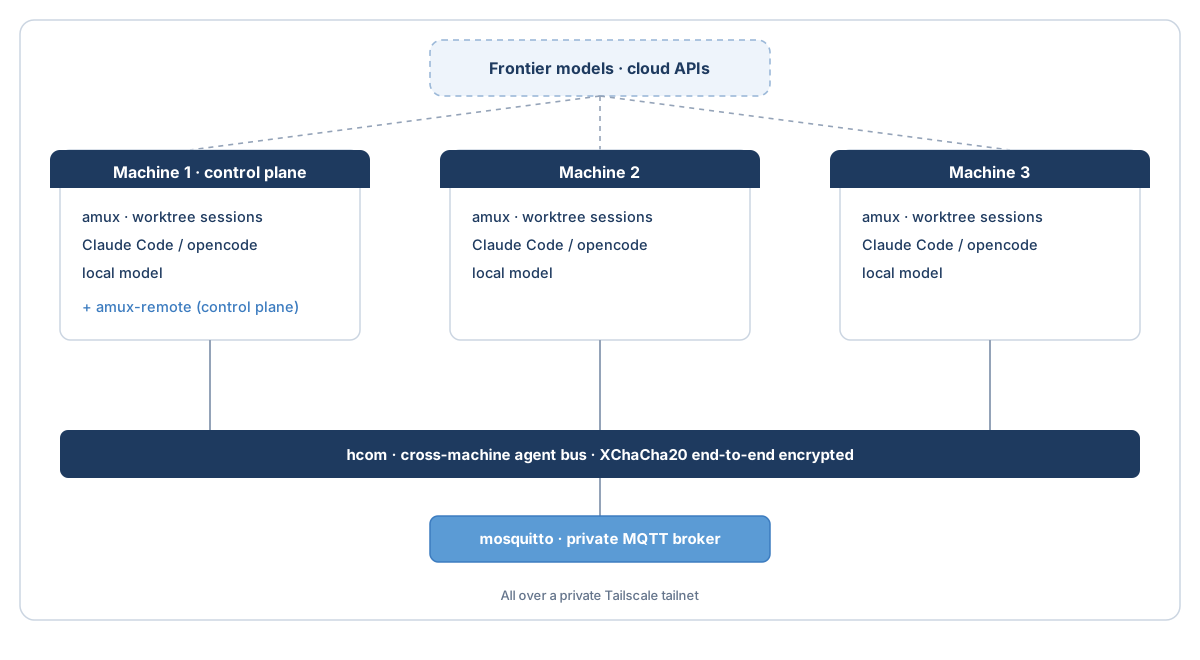
The pieces
- amux runs the agents on a machine. Each session gets its own git worktree — a separate checkout of the same repository — so two agents can edit the same project at once without overwriting each other. For example, one can refactor a module while another writes its tests, and you review the two branches separately. amux also serves a small web dashboard, so every session is visible in one page.
- hcom is the wire between machines: a cross-machine bus, encrypted end-to-end (XChaCha20), that lets agents on different machines send each other messages — claim a task, flag a collision, pass a result.
- mosquitto is the private MQTT broker the bus syncs through. It is bound to the private network and requires a password, so coordination traffic never reaches the public internet.
- Tailscale is the private network (a WireGuard mesh) everything runs over. Each machine gets a stable address on it, and nothing has to be exposed publicly.
- The agents — a coding agent such as Claude Code or opencode, plus a local model served on the same machine for routine work. See local and frontier models .
Two lanes
Most real work splits into a large routine part and a small hard part, so the stack runs them on two lanes. The local lane is a model running on your own hardware, through opencode or a similar tool, and it handles the routine 80% — small edits, test runs, mechanical refactors — at no marginal cost and without anything leaving the machine. The frontier lane, through Claude Code, takes the hard 20%: the design decision, the subtle bug, the unfamiliar codebase.
The two are not interchangeable. A local model is smaller and will miss things a frontier model catches, so the useful split is to let the local lane do volume and the frontier lane make the calls that matter — for example, the local lane drafts a change and the frontier lane reviews it. You decide which lane a task goes to.
You stay in control
Agents are fast, and confident, and confidently wrong often enough that you cannot hand them the wheel and walk away. The point of this setup is not to remove yourself; it is to see more of what the agents are doing and to keep the final call yours. Three things make that practical: the dashboard shows every session at once, the message bus shows what the agents tell each other, and one worktree per agent keeps every change isolated and reviewable before it merges. You remain accountable for what ships.
Scope the blast radius
Where to go next
- Start on one machine: Run agents on one machine .
- Then connect more: Connect machines with hcom .
- Mix in a local model: Local and frontier models .
- Quick command lookup: amux cheat sheet .
Source: content/concepts/multi-machine-agent-stack.md · maintained in the nuilab-agenticai repository.